One SVG Wobble Filter Cost 15 Seconds of Worker CPU. I Rebuilt It in 200 Lines
Rendering a 2400 px print image with resvg on Cloudflare Workers took over 15 seconds of CPU, almost all of it in feTurbulence. Computing only the alpha channel the displacement reads, on a coarse grid, brought it to about a second with 0.15% of pixels different.
Yunseon Hong10 min read
Wobblefolk draws doodle avatars whose outlines wobble a little, as if drawn by a shaky hand. The browser renders them as SVG and never complains. The trouble started with phone cases. The print partner needs a 2400 px PNG, and that PNG is drawn on the server: resvg, a Rust SVG renderer, compiled to WebAssembly and running inside a Cloudflare Worker.
The first print render took 11 to 15 seconds, and the partner’s image upload timed out waiting for it. Rendering the image ahead of time helped until a render used 17.5 seconds of CPU against the 15 second cpu_ms limit I had set, and the Worker died with exceededCpu. Two renders at once went over the 128 MB isolate memory limit instead. I raised the CPU limit to 60 seconds and drew print images one at a time, which stopped the failures. Then I removed the filter from the SVG and rendered again. It finished in 0.2 seconds.
For reference, the Workers limits page gives paid plans a 30 second CPU default per request, configurable up to 5 minutes, and 128 MB per isolate. I read it on 16 October 2026.
The wobble is a noise image and a pixel shift
The wobble is two filter primitives. feTurbulence generates cloudy Perlin noise, and feDisplacementMap moves each source pixel by an amount read from that noise.
<filter id="w" x="-5%" y="-5%" width="110%" height="110%">
  <feTurbulence type="fractalNoise" baseFrequency="0.035" numOctaves="2" seed="229"/>
  <feDisplacementMap in="SourceGraphic" scale="5"/>
</filter>
Without the filter, the outlines are clean vector curves.

This is the alpha channel of the noise, shown as gray. Brighter means a larger value, and the same seed always gives the same pattern.
Shift every pixel by that noise and the outline wobbles by a few pixels.

Each output pixel takes the source pixel at an offset of scale × (noise − 0.5). When xChannelSelector and yChannelSelector are omitted, both default to A, so the displacement reads the alpha channel of the noise and nothing else. That detail matters below.
resvg computes four noise channels and uses one
The same frame SVG, with three of these filters, took 0.45 seconds without filters and 4.3 seconds with them on my Mac. Ninety percent of the time was the filter. Opening resvg’s turbulence code showed why. It evaluates the noise function for every channel of every pixel:
pixel.r = turb(0);
pixel.g = turb(1);
pixel.b = turb(2);
pixel.a = turb(3);
With the default selectors, three of those four evaluations are thrown away. At 2400 × 2400 that is about 23 million noise evaluations per filter, and 17 million of them are never read.
WebAssembly adds to it. The same file took 1.6 seconds with the native resvg 0.45.1 CLI and 4.3 seconds through @resvg/resvg-wasm 2.6.2, the latest version on npm.
Keeping resvg for everything except the filter
I did not replace resvg. It still draws every shape and every glyph. The new code, raster.js, about 200 lines, only takes the filter away from it.
The steps, in the order the code runs them:
- Split the SVG in paint order into layers: runs of unfiltered elements, and single filtered elements. For each layer, hide everything else with
display="none", strip thefilterattribute, and let resvg draw it. - Compute noise for the alpha channel only, and only inside the area the layer actually painted. Even there it is sampled every 4 pixels and interpolated in between. The noise period is tens of pixels, so the grid is invisible. That is at most 1/64 of the evaluations resvg makes.
- Round each offset to a whole pixel and take the nearest source pixel. resvg samples the same way, and that rounding is where the jagged, drawn by hand look of the edge comes from.
- Match the color shift too. SVG filters default to the linearRGB color space and go through 8 bits and back, which darkens dark colors slightly. A lookup table with 256 entries reproduces it.
- Encode the PNG myself, one row at a time into
CompressionStream('deflate'). A 2400 × 2400 RGBA buffer is 23 MB, and holding a second copy for an encoder is how the 128 MB limit gets hit.
The noise function is a direct port of the reference implementation in the SVG 1.1 specification. To get the same pattern, the random number generator has to be consumed in the spec’s order, so the gradients for R, G and B are still generated at setup and discarded. That costs one setup pass, not anything per pixel.
Results
Render time for one frame SVG (three wobble filters) to PNG on my Mac, Node 22, resvg-wasm 2.6.2, median of three runs:
| Width | No filter | resvg filter | raster.js |
|---|---|---|---|
| 1080 px | 0.11 s | 0.89 s | 0.20 s |
| 2400 px | 0.45 s | 4.31 s | 0.88 s |
On Workers, the print render went from more than 15 seconds of CPU to about one second. The 60 second limit is still set, and nothing comes close to it now.
Speed was not enough on its own. Avatars are already shared and printed on cases, so a faster renderer that draws them differently would be a regression. I compared the output against resvg pixel by pixel. On the 2400 px frame, 0.15% of pixels differ by more than 16 in any color channel.
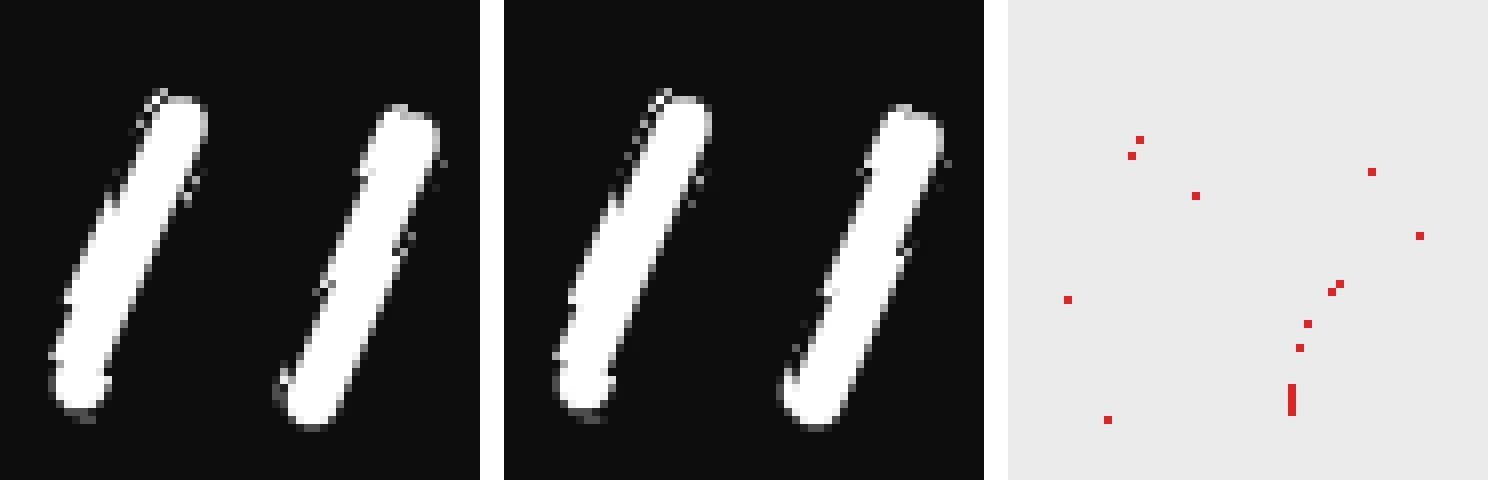
Zoomed in 8x on the sunglasses highlight, the resvg render (left) and the raster.js render (middle) have the same jagged edge. The red dots on the right are the pixels that differ, all on edges where an offset rounded to the neighboring pixel.
That comparison runs in npm test for four cases: a translucent overlay, user text decorations, the wide Open Graph card and a plain avatar. The test fails if more than 1% of pixels differ.
The fix belongs in resvg
A workaround like this should eventually be deleted, so I opened linebender/resvg#1162 with the repro SVG and the numbers above. The proposal is to pass the set of channels downstream primitives read into the turbulence pass and skip the rest. I offered a PR if the approach is acceptable.
While measuring I found one more thing. The same SVG rendered with the newer native resvg 0.45.1 wobbles far more.

The left side is resvg-wasm 2.6.2, which production uses. raster.js, ported from the spec, matches it. The right side is resvg 0.45.1. There is an open report that resvg applies the displacement scale twice (#1160), and this looks like that bug. I have not checked it against the resvg source.
So a routine renderer upgrade could change avatars people have already bought. Before bumping resvg-wasm, the pixel comparison test has to pass.
Two limits remain. Each layer is drawn at full size, so an avatar with many text decorations calls resvg ten or so times, and if that gets slow I will crop filtered layers to their painted area first. And raster.js uses a regex parser that only understands the SVG Wobblefolk produces, so I am not publishing it as a library. I would rather wait for resvg to make it unnecessary.
Filed under Build log