Anthropic's Design Skill Now Lists Claude's Own Orange as an AI Tell
The September 2026 rewrite of frontend-design names the looks AI pages keep landing on, and one of them is Claude's accent color. I gave Claude the same brief with and without it, and the default came back cream and orange. What the five design skills people install actually do, and the two I would add first.
Yunseon Hong10 min read
On 3 September 2026 Anthropic merged a change to its frontend-design skill titled “Update frontend-design skill to avoid generic design defaults”. The new version contains a list of five looks that pages built by AI keep landing on. The first is a warm cream background with a serif display face and a terracotta accent “often near #D97757”, which the skill itself identifies as Anthropic’s own Claude accent. On a client’s page, it says, that color reads as a tell.
The third look on the list is a broadsheet layout with hairline rules and zero border radius. That is this site. ondelva’s design notes pin radius to 0 and draw every divider as a 1px hairline, and the small labels are set in a monospace face, which is item five. I chose all of it on purpose, and the skill allows for that: “the brief’s own words always win.” But it was a strange thing to read about my own homepage.
That list is the clearest answer I have found to the question people are actually asking when they search for Claude design skills. A skill does not make Claude a better designer in general. It removes the defaults Claude reaches for when nobody told it what to do.
The short answer
If you build web pages with Claude Code and want one thing installed, install frontend-design. If you want two, add Vercel’s web-design-guidelines, because the first one sets direction and the second one checks the floor. The three community skills below are bigger, ship scripts or binaries, and are worth it only if you want what they add.
| Skill | Job | What it brings | Runs code | GitHub stars (15 Oct 2026) |
|---|---|---|---|---|
| frontend-design (Anthropic) | Sets a visual direction before code | One SKILL.md, about 1,500 words | No | 181k for the whole anthropics/skills repo |
| web-design-guidelines (Vercel) | Audits existing UI code | Fetches about 100 rules each run, reports file:line | No, but needs network | 32k for vercel-labs/agent-skills |
| Impeccable | Commands for each design problem | 24 commands, 59 deterministic detector rules | Yes, a downloaded binary | 81k |
| UI UX Pro Max | Picks a design system from a catalog | 79 styles, 192 palettes, 74 font pairings | Yes, a Python search script | 136k |
| Taste Skill | Builds a page and checks it in a browser | 20 art directions, real archive photos | Yes, Node 22+ and Chrome | 96k |
Star counts came from the GitHub API on 15 October 2026. They measure attention, not quality, and the two vendor repos hold many skills, so their numbers are not comparable to the repos that hold one skill. The “installs” figures on skill directories and listicles are worse: I found three numbers for frontend-design that differ by a factor of three and could not trace any of them to a source, so none of them are in the table.
What a skill is, in one paragraph
A skill is a folder with a SKILL.md file in it. Claude Code reads the short description line of every installed skill at the start of a session and loads the full body only when a task matches. So a design skill costs almost nothing until you ask for a page, and then it puts a page or two of instructions in front of the model before it writes CSS. Nothing about the model changes. What changes is the brief it works from.
Why a design skill exists at all
Ask a model for a landing page with no direction and it gives you the average of the landing pages it has seen. The first public version of frontend-design, in December 2025, attacked that with a ban list: no Inter, no Roboto, no purple gradient on white, and “NEVER converge on common choices (Space Grotesk, for example).” It told Claude to “pick an extreme” tone, from maximalist chaos to brutalist.
If the rewrite is any guide, that worked well enough to create a new average. The new list is cream and terracotta, or black with one acid green accent, or newspaper columns with no rounded corners. The September rewrite reads like it was written by someone who looked at a few thousand of them. It drops the push toward extremes and replaces it with a process:
- Write a compact token plan first: 4 to 6 named hex colors, the typefaces and their roles, a layout sketched in ASCII, and the principles that make this page different.
- Review the plan against the brief. If any part is what you would produce for any similar prompt, revise it and say what changed.
- Build, then critique the result from screenshots, and “remove one accessory” before calling it done.
It also names details that are hard to unsee once listed: one word in the headline set in a different color, eyebrow labels in all caps over every section, 01 / 02 / 03 markers on content that is not a sequence, and the same fade and slide up on every section. The writing section is short and good. Buttons say what happens (“Save changes,” not “Submit”), and the toast after “Publish” says “Published.”
Same brief, run twice: the default came back cream and orange
I wanted to know whether that list describes something real, so on 15 October 2026 I gave Claude Code the same brief twice: a one page site for a made up bicycle repair co-op called Spoke & Sprocket, written as a single index.html with inline CSS, Google Fonts allowed, no images. Both runs used Claude Code 2.1.300 and Opus 5.5 in an empty folder, with my user settings and plugins switched off. The second run also had frontend-design loaded, and Claude called it before writing a line. Neither run was allowed shell commands, so neither could screenshot its own page. That is one run each. Read it as an anecdote, not a benchmark.
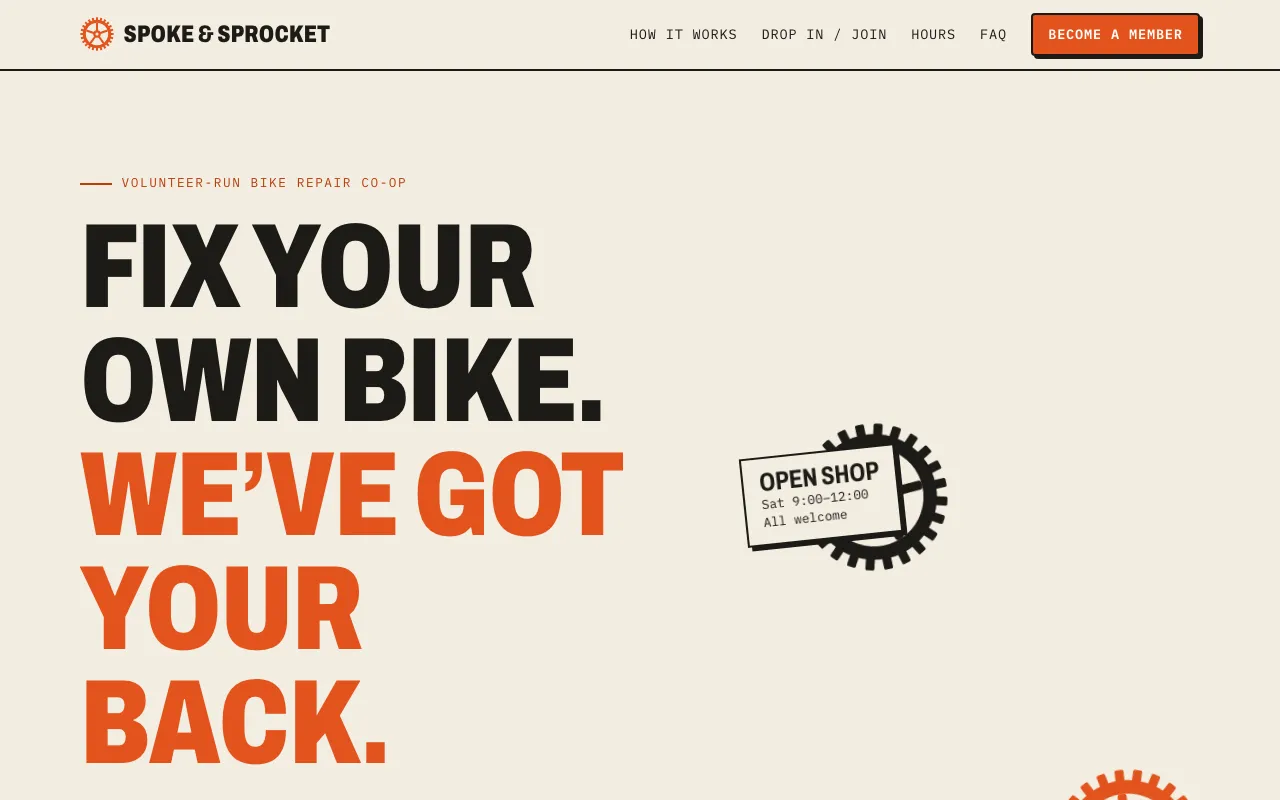
Without the skill, Claude chose a paper background of #f3ede1 and an orange accent of #e2531d. The skill’s first cluster is #F4F1EA with an accent near #D97757. Then the page kept going down the list. Labels and navigation in IBM Plex Mono, with text-transform: uppercase appearing 13 times in the CSS. The second half of the headline in the accent color, and the closing headline done the same way. Six meta lines joined with middle dots. Five links ending in →. It also used 01 / 02 / 03 markers, but on the three steps of a visit, which is a real sequence, so that one does not count against it.
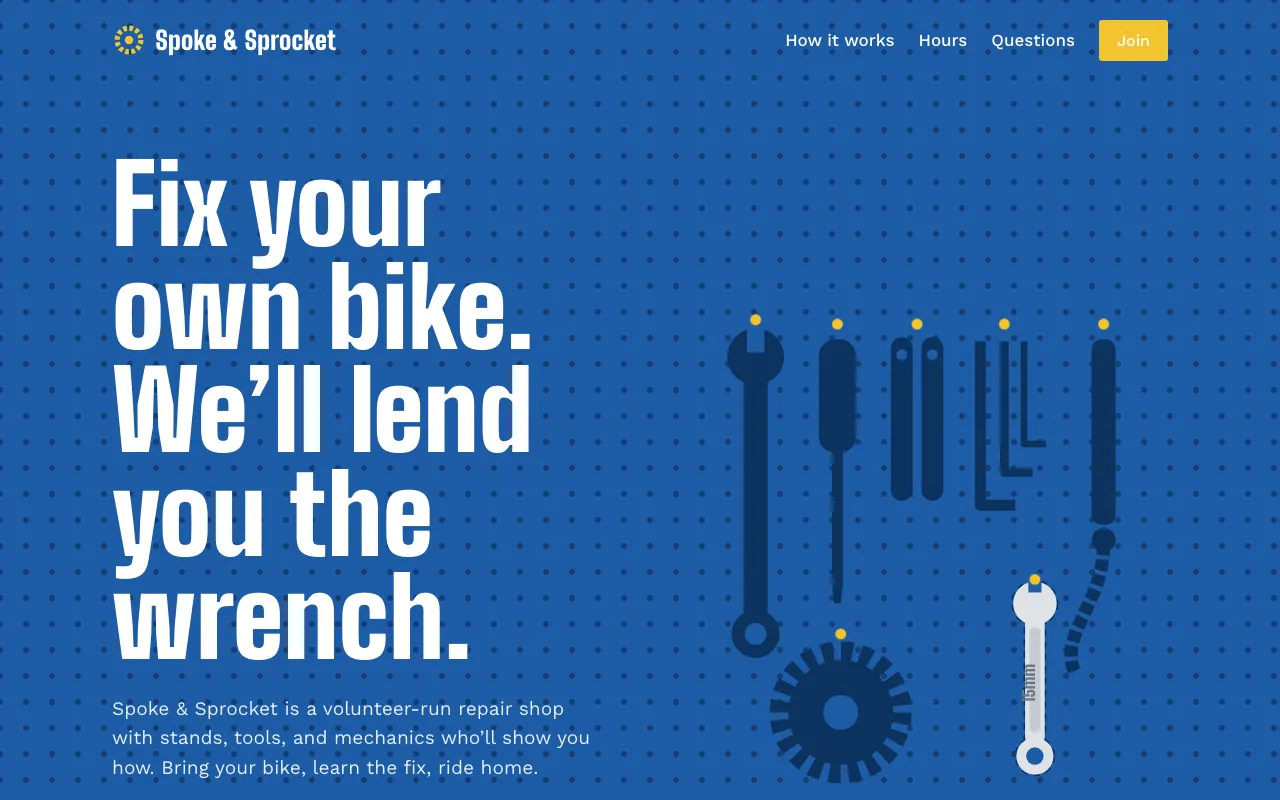
With the skill, the page opens on shop blue #1d5ba6 with a pegboard dot pattern and a drawn tool wall, and a 15mm wrench drops onto its empty hook once when the page loads. The type is Big Shoulders Display and Work Sans, in sentence case. The CSS has no uppercase rule, and the page has no arrows and no middle dots. Claude’s closing note said the blue came from the tool walls bike shops are known for. That is the skill’s “ground it in the subject” instruction doing exactly what it says.
By Claude Code’s own accounting the run without the skill cost $0.60 and took 2 minutes 24 seconds. The run with it cost $0.70 and took 2 minutes 51 seconds. Ten cents bought a page I could not have mistaken for the template.
frontend-design: direction, not checks
The strength of Anthropic’s skill is that it is plain text you can read in five minutes, and it changes how Claude starts, not just what it avoids. The weakness is that it checks nothing. It asks for a quality floor (responsive to mobile, visible keyboard focus, reduced motion respected) and trusts the model to deliver it.
In Claude Code it installs from the official plugin marketplace:
/plugin install frontend-design@claude-plugins-officialweb-design-guidelines: the auditor
Vercel’s skill is the opposite. It has no taste at all. Its SKILL.md tells the agent to fetch the current Web Interface Guidelines and check your files against them, reporting each problem as file:line. The rules are concrete enough to grep: buttons with only an icon need aria-label, never outline: none without a replacement, never transition: all, honor prefers-reduced-motion, inputs need autocomplete and the right type, never block paste.
I ran the three CSS rules against this site by hand before writing this. No transition: all, no bare outline: none, and a prefers-reduced-motion block in the global stylesheet. That took one grep, which is the point: these rules are checkable, so a skill that checks them is worth more than one that asks nicely.
Because it fetches the rules on every run, it needs network access, and the rules can change under you. Pin a copy if you need repeatable reviews.
npx skills add https://github.com/vercel-labs/agent-skills --skill web-design-guidelinesImpeccable: frontend-design plus a toolbox
Impeccable says in its README that it started from Anthropic’s skill. It adds a setup command that writes a PRODUCT.md describing the audience and purpose, then 24 commands that each target one problem: /impeccable audit, critique, typeset, layout, quieter, bolder, harden for error states and text overflow. Its 59 detector rules run without an LLM or API key, which makes them usable in CI.
On paper this is the most complete option. It is also the heaviest. The installer downloads a binary engine on first use and can add hooks to your agent config, which you then approve. Read what it installs before you run it in a repo that matters.
UI UX Pro Max: a catalog
UI UX Pro Max works from data. A Python script searches CSV files of 79 named styles (50 active), 192 palettes matched to 192 product types, 74 font pairings, and guidelines for 22 stacks including Astro, Next.js, SwiftUI and Flutter. You describe the product and it returns a design system with an anti-pattern list, such as no “AI purple/pink gradients” for banking.
That is useful if you have no design opinion and want a defensible starting point fast. It also pulls in the opposite direction from frontend-design, which argues that a look picked from a list is a default by another name. I would use it for an internal dashboard, not for a page that has to be remembered.
Taste Skill: the one that looks at its own work
Taste Skill v2 is built from a study of 247 sites. A script deals three of 20 art directions and the agent picks one, builds with real photographs from open archives (credited), then opens the page in a real browser at three widths, fails it on slop, and fixes the top three problems for up to three rounds.
The browser loop is the part the others lack, and it is the part that matters most, because a model that never sees its page is guessing. It needs Node 22+ and an installed Chrome, Edge or Chromium, and image search needs network access.
What I would install
frontend-design and web-design-guidelines. One changes how Claude starts a page, the other catches what it got wrong, and both are text you can read in full before installing. Everything else on the list runs code on your machine, which is fine, but it moves the decision from “do I like these instructions” to “do I trust this project,” and that deserves its own five minutes.
If your project already has a design system, write it down where the agent will read it. Mine lives in docs/DESIGN.md, and it is why a skill that calls broadsheet layouts with square corners a tell does not undo them here: the brief wins, and the brief is written down.
The current frontend-design SKILL.md is shorter than this post. Read it before installing anything else.
Filed under Tooling