I Trained Create ML on Twelve Korean Paintings. It Learned the Paper
Before building Hwagong, I trained thirteen Create ML style transfer models on public domain Korean paintings and ran them against a filter I wrote by hand. The models came out fast and small, and every one of them looked like a vintage sepia filter.
Yunseon Hong10 min read
Hwagong is an iPhone app that redraws photos as Korean woodblock prints, ink wash, line drawings and palace colors. Before I wrote any app code I had to pick between two ways of building it. One was to write the styles by hand, as image processing code with parameters I could tune. The other was to train a model on real Korean paintings and let it learn the look.
The second option sounded like less work and a better result. Apple ships style transfer in Create ML, the model runs on the Neural Engine, and most of the paintings are centuries old and free to use. I gave both approaches the same sixteen test photos and compared the results in one sheet. The custom filters won by a wide margin, and the reason is specific enough to be worth writing down.
The setup: twelve paintings, thirty-six photos, one sheet
I used only paintings whose image files I could confirm were free to use and modify commercially. Eight came from The Met and the Cleveland Museum of Art, whose open access images are CC0. Four came from Gongu Madang, the Korea Copyright Commission’s archive of works anyone can reuse, where I opened each work’s page to check its terms. Three of those, all by Kim Hong-do, carry a CC BY credit requirement. A painting from 1751 is no use if the scan of it is someone else’s copyright.
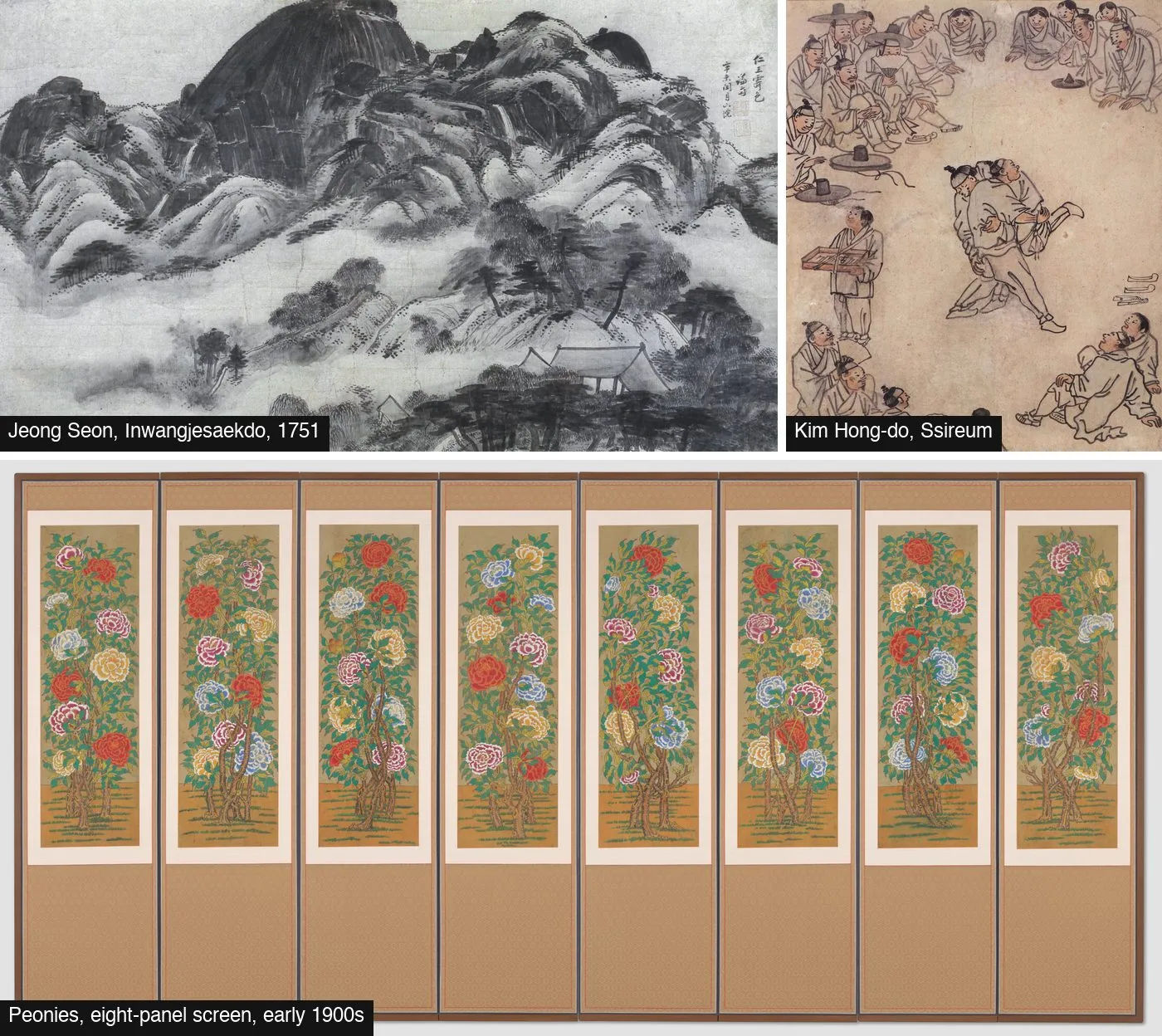
The set covered most of what people mean by Korean painting: Jeong Seon’s true view landscapes, Kim Hong-do’s genre scenes, tiger paintings, folk paintings of peonies and lotuses, and a bird and flower screen by Jang Seung-eop. Kim Hong-do’s Ssireum above is credited to 한국데이터베이스산업진흥원 (Korea Data Agency) via Gongu Madang.
Training ran through a short Swift script around MLStyleTransfer. The content set was 36 CC0 photos from Wikimedia Commons. The test set was 16 more, spread over portraits, landscapes, Seoul streets, food, pets and night scenes. Every result went into an HTML sheet with photos as rows and styles as columns, so I could judge by looking across a row rather than by remembering.
Create ML trains at 512 by 512, and that was easy to fix
The first problem was mechanical. A Create ML style transfer model takes a fixed 512×512 input, so a 4:3 photo gets squashed into a square. The network is fully convolutional, though, so the fixed size is a property of the model description, not of the weights. Rewriting the spec with coremltools to accept anything from 256 to 4096 pixels on each side made it run at the photo’s own shape:
spec = ct.utils.load_spec(sys.argv[1])
r = fsu.NeuralNetworkImageSizeRange()
r.add_height_range((256, 4096))
r.add_width_range((256, 4096))
for name in ("image", "stylizedImage"):
    fsu.update_image_size_range(spec, feature_name=name, size_range=r)
ct.utils.save_spec(spec, sys.argv[2])
One small trap on the way: coremltools 9 had no native module built for Python 3.14 when I ran this. Editing a spec never touches the native module, so the script worked anyway, but don’t read the warning about the missing module as a sign that it can’t.
The parameter for texture scale is spelled textelDensity in the Swift API, with the extra “e”. Autocomplete will save you. Guessing will not.
Speed and size were never the problem
The models were cheap by every number I measured. Each one is 6.4 MB, whatever painting it learned. On an Apple silicon Mac, a 1280 px photo took about 145 ms and a 640 px photo about 37 ms. Training cost around 0.56 seconds per iteration at texel density 256, so a 400-iteration model was ready in under four minutes.
My own filters started slower. My first versions were Python and OpenCV on the CPU, at 195 to 340 ms for the same 1280 px photo. Only after porting them to Metal did they pass the models.
The Mac numbers come from my own runs on an Apple silicon Mac. The iPhone row is the final filters on an iPhone 17 Pro, measured on the device after the Metal port. I never ran the models on the phone, because by then they were already out.
If the comparison had been about speed, size or effort, the models would have won. Inference is one Core ML call. The filters needed custom Metal kernels, a resize kernel of my own after Apple’s Lanczos upscaler drew a dark line around the image edge, and days of tuning. The models lost on the one thing the app is for.
The models learned the paper, not the brushwork
I started the parameter search with Jeong Seon’s Inwangjesaekdo, because ink wash was the style I cared about most.
| Settings | What came out |
|---|---|
| Strength 5, density 256, 500 iterations | A color grade. Saturation drops, everything turns blue gray. No ink, no brush |
| Strength 10, density 256, 128 or 64, 300 iterations | Embossed, metallic noise, inverted tones, halos around subjects |
| Strength 7, density 256, 500 iterations | Milder than 10, same kind of noise |
| Same model, inference at 640 px | Bigger texture, same character |
There was no setting in between that looked like ink. My reading of why: the style loss in this kind of model matches texture statistics across the whole painting, and most of the area in a Korean ink landscape is empty paper or silk. The mountain and the pines are a minority of the pixels. So the model learns the grain of the silk and the age of the paper, and when you turn the strength up, that grain turns into noise. Apple does not document the loss, so treat that as an explanation that fits what I saw, not a fact about Create ML.
The rest of the paintings, trained at strength 6, density 256 and 400 iterations, made the pattern clear.
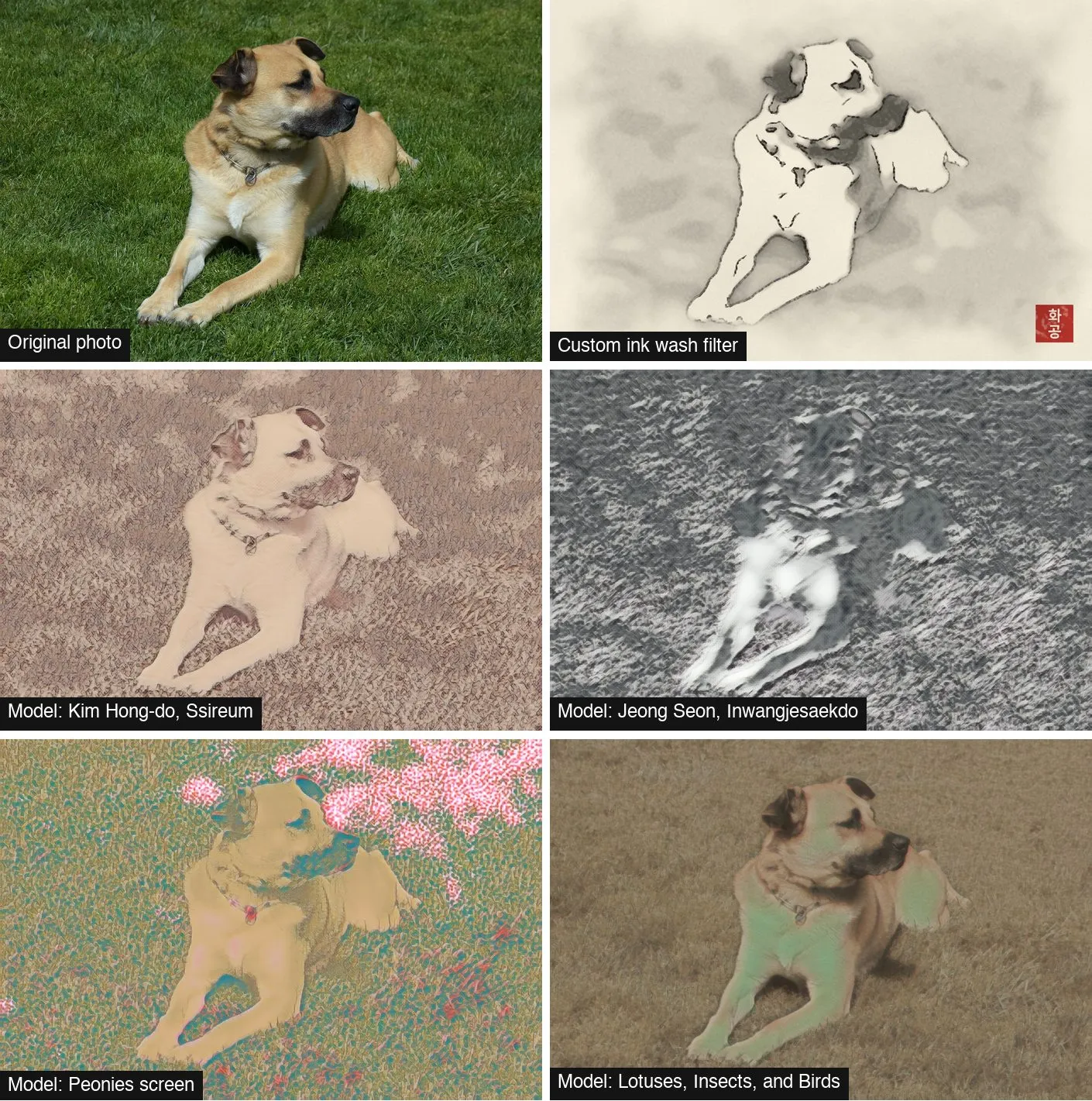
The dog shows the failure modes in one photo. The Ssireum model, the best of the thirteen, gives an old pen sketch on brown paper, but the grass becomes a field of embossed marks. Inwangjesaekdo at strength 7 buries the dog in gray relief. The peony screen threw pink and green blotches across the lawn, and the lotus painting faded the photo and tinted the dog’s legs green. The custom ink wash filter, second in the grid, is the only one where the grass disappears into a wash and the dog stays.
| Training painting | Result across 16 photos |
|---|---|
| Kim Hong-do, Ssireum | Pen sketch on old paper. Cleanest of the models. Embossed foliage |
| Tiger Family, folk painting | Sepia etching. Good on streets, cats and food |
| Jeong Seon, Mt. Inwang (The Met); Samoje landscape | Etching on brown paper. Relief noise behind portraits |
| Kim Hong-do, Weaving | Faint brown sketch |
| Kim Hong-do, Tiger under a Pine | Muddy orange cast |
| Tigers and Leopard, ink | Gray sketch, low contrast |
| Peonies screen | Pink and green blotches. Failed |
| Lotuses, Insects, and Birds | Faded grade, skin turned green. Failed |
| Jang Seung-eop, screen | Vertical stripe noise. Failed |
| Golden Rooster and Hen | Soft sepia grade. Little noise, little effect |
The Jang Seung-eop result is the clearest case of the model learning the object instead of the art. The painting is a folding screen, and the stripes in the output are the panel seams.
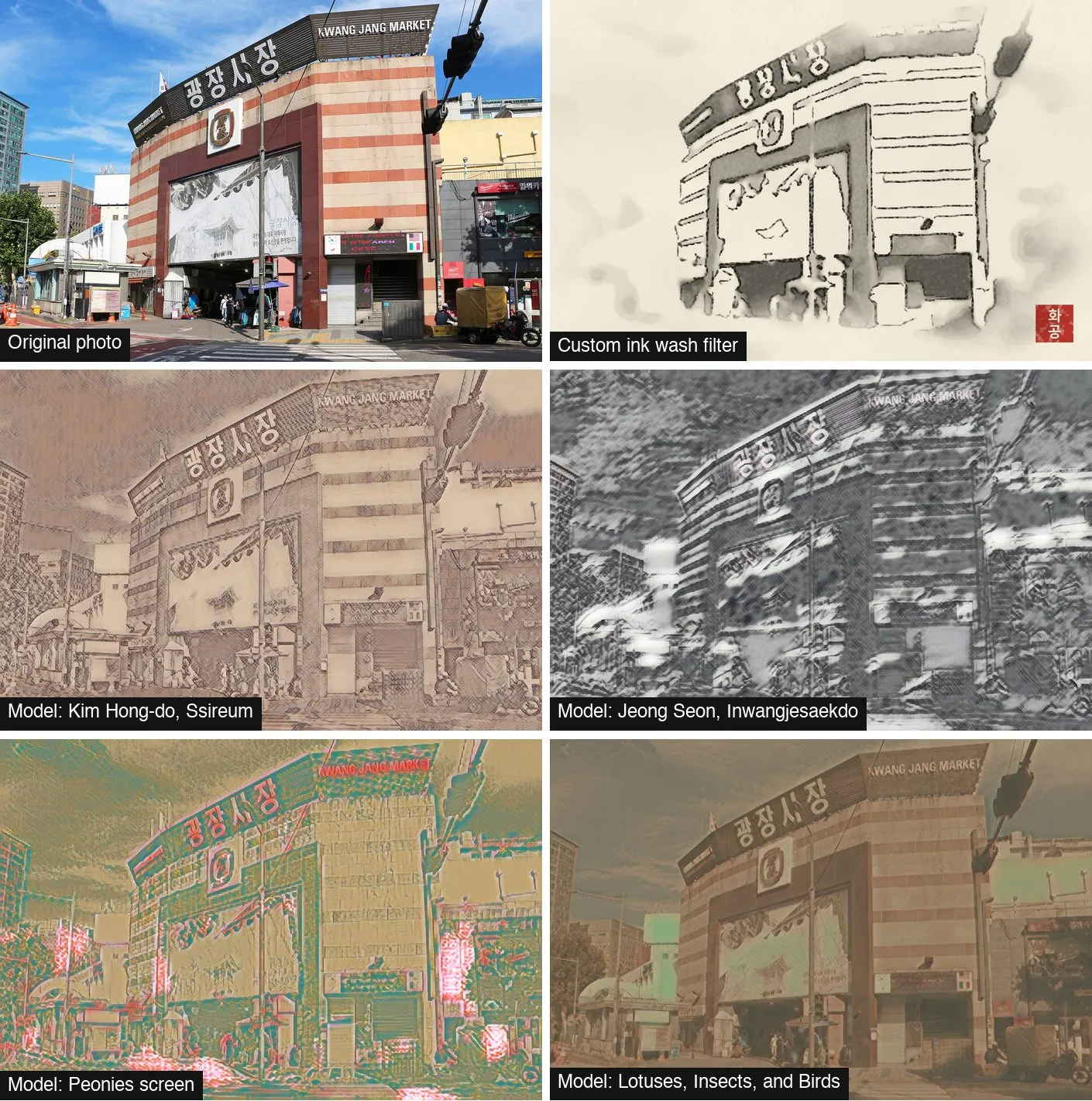
On a street scene the best models do better. The market building survives as a brown etching. But look across the bottom row and ask which painting each one was trained on. I could not tell, and I was the one who trained them. Every model reads as “vintage sketch” or “sepia”. None of them reads as Korean.
What the custom filter does that the models could not
The ink wash filter is not clever. It flattens the photo, quantizes it into a few ink tones, draws edges, bleeds the edges with noise, and lays the result on a hanji paper texture with a red seal. What makes it look like ink wash is two decisions a texture model has no way to make.
The first is empty space. Apple’s Vision framework separates the subject from the background, in 60 to 170 ms per photo on my Mac, and the filter turns the background into pale wash instead of drawing it. That is the move a Joseon painter makes: paint the dog, leave the lawn as paper. A style transfer model treats every pixel the same, so the lawn gets as much texture as the dog.
The second is that every part of the look is a parameter I can see. Ink color, paper color, how far the ink bleeds and how much of the background fades are numbers in a preset file, and the same input with the same preset gives the same output byte for byte. With a model, strength is fixed at training time. In the app you could only blend the result back toward the original.
I put the two approaches in a scoring table at the review gate, and quality decided it: three custom styles rated four stars, the best models two. The app shipped with four custom styles and no models. A fifth, a folk painting style, is on hold because its flat color areas band on smooth gradients.
When I would look at models again
Not Create ML style transfer, and not this kind of model. What a photo needs to become an ink painting is a change of structure: which parts get drawn, which get left out, where the line goes. Texture transfer can’t make that change. I wrote down two conditions for trying again: a model that can restructure an image without paired training data, such as a diffusion model built for image translation, running on device through Core ML, at a size and speed that fit a free camera app. Neither was true when I made the call on 14 October 2026.
The thirteen experimental models are still on my disk, 83 MB of vintage sketch filters. The one I would keep is Ssireum, and only because it is a pleasant sepia. It just isn’t Korean painting.
Filed under Build log