getimg.ai Review: What Each Model Actually Costs Per Image
getimg.ai puts about twenty image models behind one credit balance. The price on screen matched every charge I made. The interesting part is Auto, which bills a flat 50 credits and sometimes routes to a model that costs 140.
Yunseon Hong12 min read
getimg.ai is not an image model. It is a workspace that sells one credit balance and lets you spend it on other companies’ models: GPT Image, Nano Banana, FLUX.2, Seedream, Qwen, Grok Imagine and older versions of several of them. Editing, upscaling, video and audio draw on the same balance.
That makes it a different purchase from the tools in my image generator guide, which is organized by model. The question here is narrower. If you pay one company to rent you everyone’s models, what does each image cost, and what do you give up?
How this review came about, since it matters. getimg.ai’s cofounder asked to be listed in that guide. I asked to test first, signed up myself, and they added 15,000 credits to the account with no subscription attached. I have also joined their affiliate program, so the getimg.ai links in this post are affiliate links: if you subscribe through one, I earn a commission. Nothing here went to them for review. Numbers below come from that account’s credit ledger, tested on 28 and 29 September 2026, and the public pricing page, last checked on 12 October 2026.
The short version
- The price shown next to the prompt box matched the ledger on every run. Same model and resolution, same charge, whatever the prompt said and whether or not a reference image was attached.
- The cheapest serious model costs 20 credits a picture and the most expensive 140. That is a 7x spread inside one subscription.
- Auto mode is a flat 50 credits at 1K. In my runs it picked GPT Image 2 (110 when chosen by hand) and Nano Banana Pro (140). You only learn which model you got by opening the result.
- On text and hands, all five top models I tried passed. The differences were taste, not accuracy.
- The two upscalers I compared are not one product at two prices. SeedVR2 (10 credits to 4K) sharpens what is there; Topaz Bloom 2 (100) repaints it.
- Batch work in the web app is clumsy, and commercial use needs a paid plan.
What a credit buys
getimg.ai plans bill monthly or yearly, and Core and above are priced per seat. The pricing page showed me Korean won; the dollar prices below are the monthly ones in the same page’s product data:
| Plan | Price (monthly, USD) | Credits per month | Per credit |
|---|---|---|---|
| Entry | $15 | 8,000 | $0.0019 |
| Core | $35 | 19,000 | $0.0018 |
| Plus | $79 | 42,500 | $0.0019 |
| Ultra | $199 | 107,500 | $0.0019 |
Look at the last column. Moving up a tier buys more credits, the full model list (Entry gets a subset of the image models, 11 when I counted), higher upscale limits and team seats. It does not buy cheaper credits. There is no free plan and no free trial, and commercial use comes with paying: the pricing FAQ allows it “only with our paid plans,” under the CreativeML Open RAIL-M license.
Each model then charges its own rate per image. The composer shows it indirectly, as “N left” next to the prompt: your balance divided by that model’s price. Divide it back out and you get the table below. I generated with each of the five main models three times and checked the ledger. Every charge matched.
| Model | Credits per 1K image | At Entry rates | Delivered size at “1K” | Time to result |
|---|---|---|---|---|
| Qwen Image 3.0 Pro | 20 | $0.04 | 1440×1440 | 100 to 140 s |
| FLUX.2 [pro] | 30 | $0.06 | 1024×1024 | 15 to 20 s |
| Seedream 5.0 Pro | 50 | $0.09 | 1024×1024 | 70 to 80 s |
| GPT Image 2.5 Sunburst | 60 | $0.11 | 1024×1024 | 15 to 30 s |
| Nano Banana Pro | 140 | $0.26 | 1024×1024 | about 30 s |
| Auto | 50 | $0.09 | depends on the model picked | varies |
Resolution is where the rate moves. Nano Banana Pro costs the same at 1K and 2K and jumps to 250 at 4K. GPT Image 2 goes from 110 at 1K to 250 at 2K. Seedream 5.0 Pro doubles from 50 to 100. A few older models (Seedream 4, 4.5 and 5.0 Lite) charge one price at every resolution they offer, which makes them the obvious pick when you need a big file and do not care which generation drew it. Qwen’s “1K” came back at 1440 pixels square while everything else was 1024, so per pixel it is cheaper than the table suggests.
Editing costs the same as generating with the chosen model. Upscaling spreads wider (quality further down): SeedVR2 to 4K is 10 credits, Topaz Bloom 2 is 50 at 1K, 100 at 4K and roughly 400 at 16K.
Auto is the pricing story
Auto is the default in the composer, and getimg.ai’s pitch leans on it: describe the job and the platform picks the model. It bills a flat 50 credits at 1K no matter what it picks.
I sent a flyer prompt with eight lines of copy through Auto. The result page said GPT Image 2, which costs 110 when you select it yourself. The ledger said 50. Then I asked Auto to edit a photo (change a blazer color, remove a laptop). It used Nano Banana Pro, which costs 140. The ledger said 50 again.
So for hard prompts, Auto is the cheapest way into the expensive models on the platform. For easy ones it probably is not: if Auto sends a simple job to Qwen or FLUX.2, you paid 50 for an image that costs 20 or 30 by hand. Two runs cannot tell you how often it routes up versus down. The only place to see the choice is the detail view of each finished image, which lists the model, the delivered size and the prompt. The ledger says “Create Image” for every generation and every edit.
The test set: five models, same prompts
Same prompts, five models, 1K, square, with getimg.ai’s prompt rewriting (“AI prompt”, on by default) switched off so every model saw the same words.
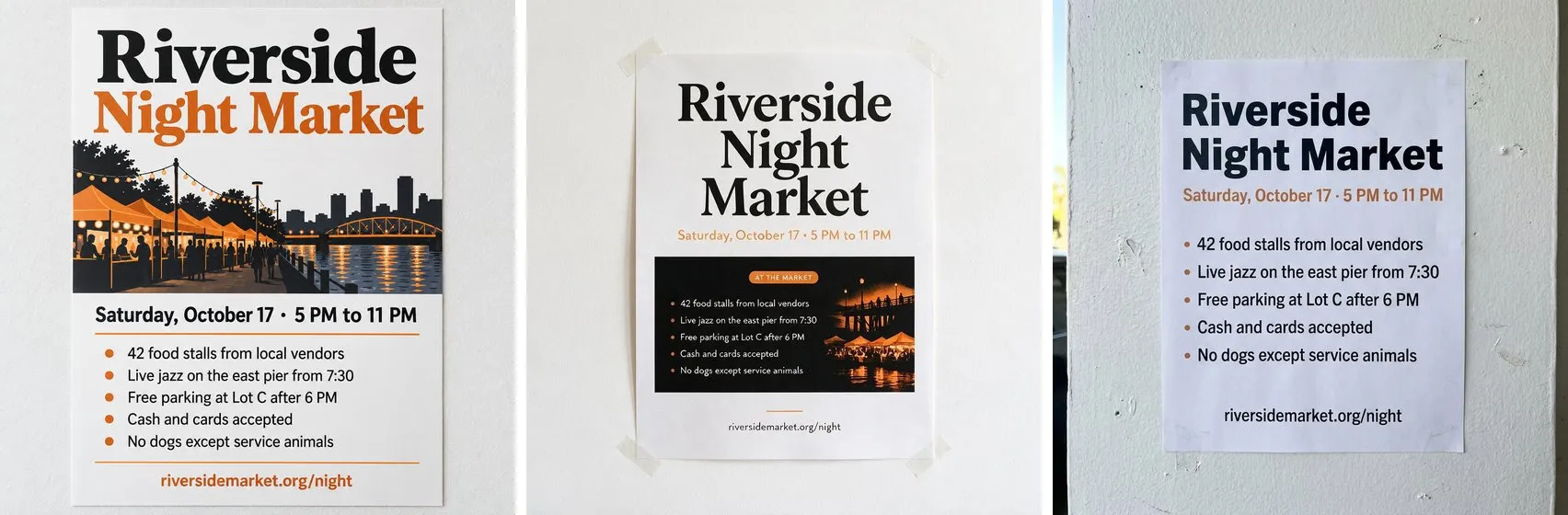
Text. A menu poster with three lines, then a flyer with a title, a date line, five bullet points and a URL. All five models spelled every word correctly, both times. The differences were editorial. Seedream set the footer in capitals nobody asked for and added an “AT THE MARKET” label. Nano Banana Pro decided the flyer should be photographed taped to a real wall. GPT Image 2.5 added an illustration of the market unprompted, and it was good.
Hands and faces. Two coworkers shaking hands across a desk, a watch on her wrist, a ring on his hand. Five for five on fingers, watch and ring. Qwen wrote a legible “Q3 Marketing Strategy” on a whiteboard I had not asked for. Seedream had both people grinning at the camera instead of each other, which reads as stock photography.

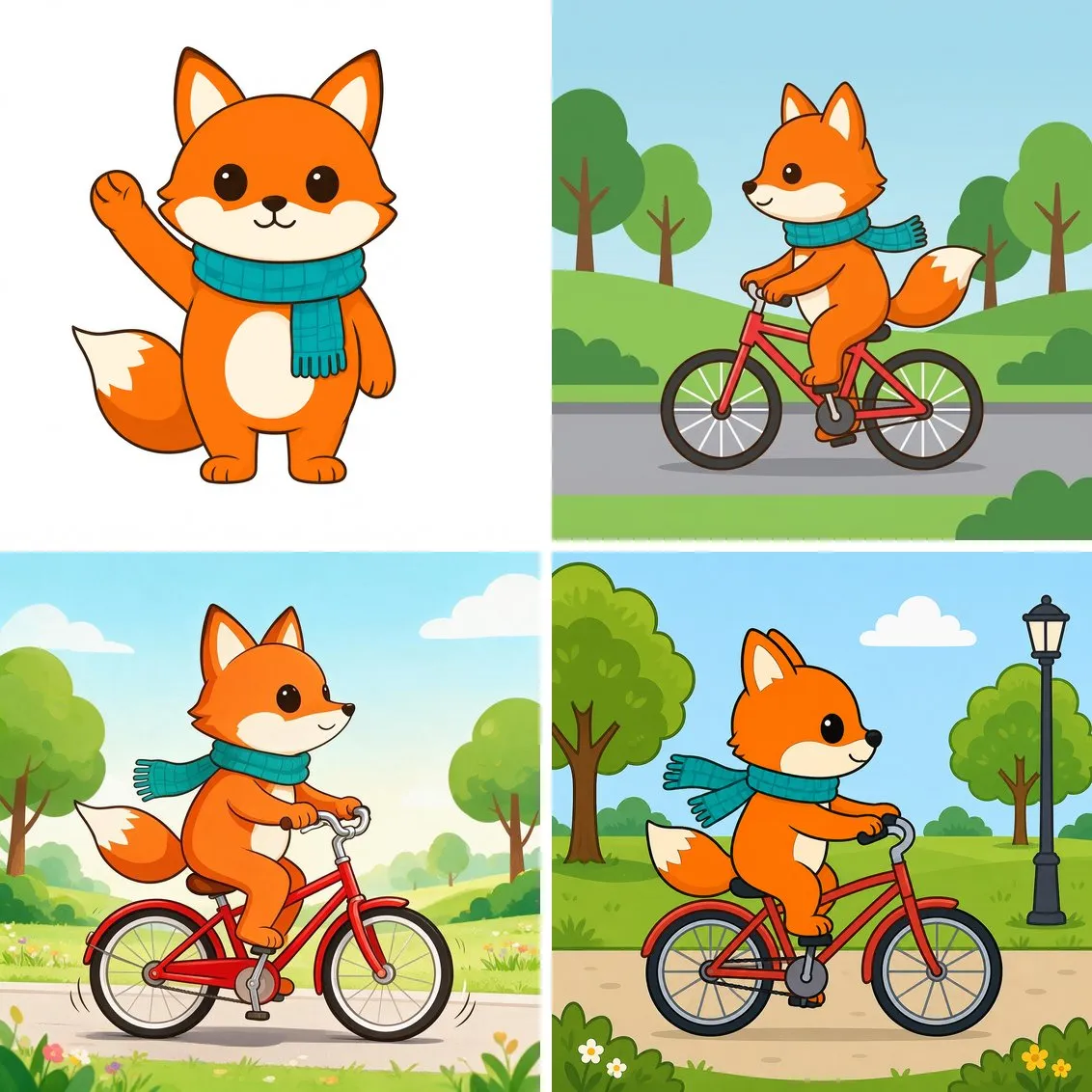
A character across scenes. I made a flat vector fox mascot with Qwen, then asked three models to put the same fox on a bicycle, using the original as the reference. Nano Banana Pro, Seedream 5.0 Pro and GPT Image 2 all kept the colors, the teal scarf and the white tail tip.
Saved characters. getimg.ai also has Elements: save up to 20 images under a name, pick one of 15 types (Person, Product, Logo, Animal and so on), and call it with @ in any prompt. Saving one cost nothing. I saved the fox as @pipfox, reran the bicycle prompt on Seedream 5.0 Pro, then asked for a new scene in a library. Two things surprised me. Elements refuse to run with prompt rewriting off (“Elements require prompt enhancer to be enabled”), so your exact wording is not what the model gets. And the fox drifted further than it had with a plain reference image. Colors, scarf and tail tip held, but the snout grew longer and the body taller, and the library scene came out shaded like a picture book instead of flat vector. Each image cost Seedream’s usual 50. Two images are not a verdict, but on this sample the plain reference image kept the character closer.

@pipfox on Seedream 5.0 Pro. Compare the head with the reference fox above.Editing. Editing works by instruction, not by mask. You open an image, type what to change, and a new version appears next to the original. My instruction had two parts (navy blazer, no laptop) and both landed with nothing else touched. The edit box offers fewer models than generation: Auto, Seedream 5.0 Pro, Nano Banana 2, Nano Banana Pro and GPT Image 2. I found no brush or inpainting mask anywhere.

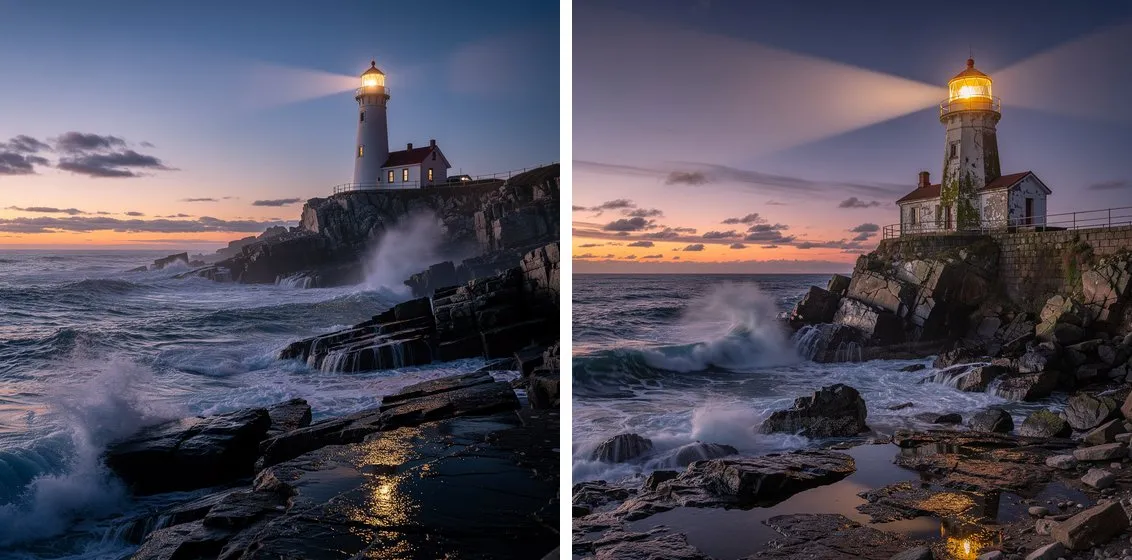
Prompt rewriting. The “AI prompt” switch sits at the bottom of the model menu and starts out on. I ran “a lighthouse on a rocky coast at dusk” through FLUX.2 [pro] once with it off and once with it on. Both cost 30 credits, so the rewrite is free. Off gave a plain, believable seascape. On added twin light beams, a weathered tower with ivy and a tide pool catching the lamp: a stock photo somebody art directed. The interface never shows the rewritten prompt. The detail view lists the words you typed for both images. The rewrite is stored, though: the app’s own media API returns it as the prompt and keeps your text as originalPrompt, so the only way I found to read what the model was actually told was the browser’s network tab. That API also showed the switch covers less than it suggests. My Auto run, the edit, and the three fox scenes I made from the edit box with a reference image were all rewritten, even though the switch was off in the composer.
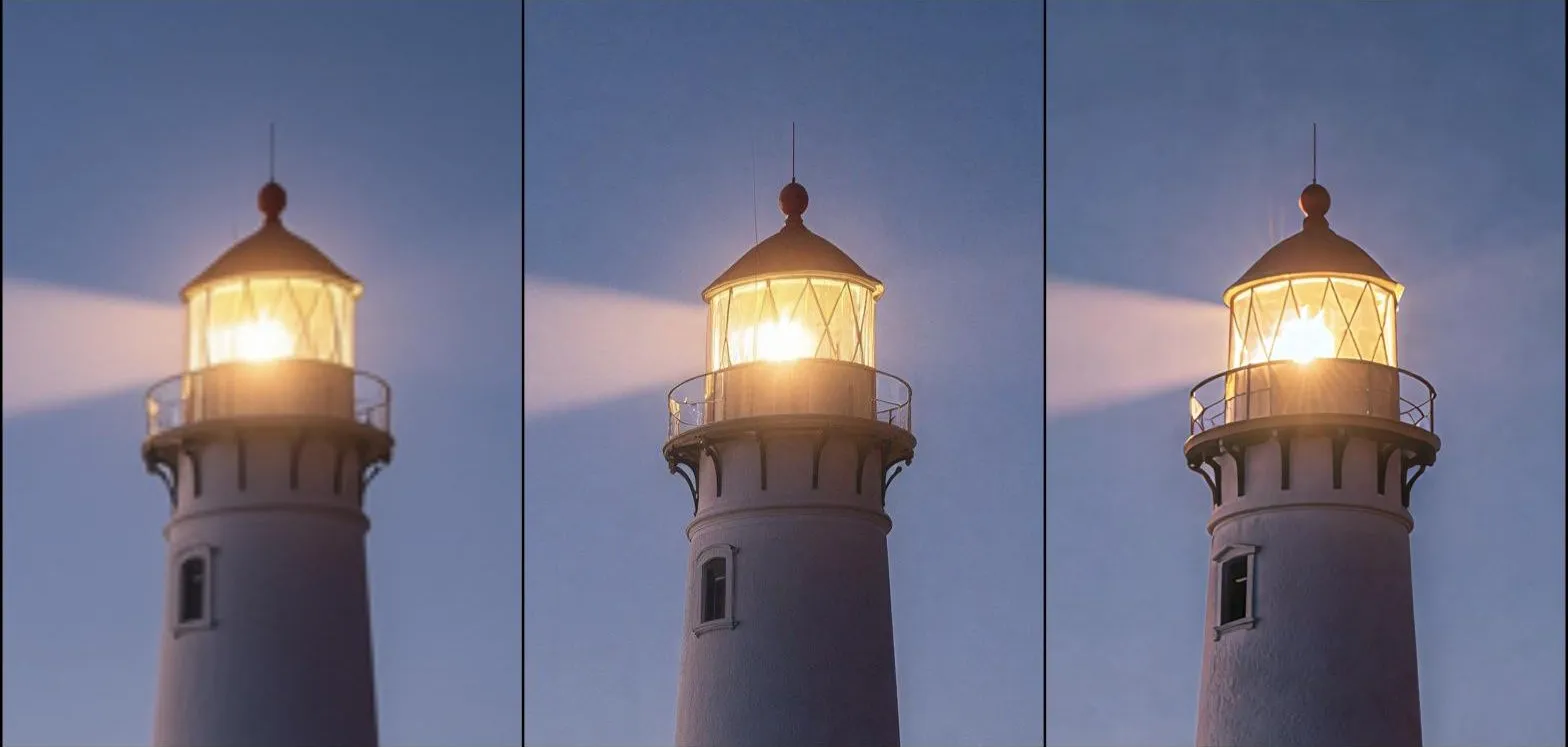
Upscaling. I sent the plain lighthouse to 4K twice: SeedVR2 for 10 credits, and Topaz Bloom 2, the default in the upscale screen, for 100. Both came back at 4096×4096, SeedVR2 as a 2 MB JPEG and Bloom 2 as a 26 MB PNG. At full size they behave like different tools. SeedVR2 sharpened edges that were already there, added faint grain to the sky and one thin stray line beside the lantern. Bloom 2 repainted. It put a starburst in the lamp and brushy texture on the tower wall, turned the spray into beaded foam, gave the rocks a wet gloss and pushed the frame toward blue. When the result has to match the original, the 10-credit option is the right one. Bloom 2 is for when you want the picture improved and accept that it changes. The menu also lists Topaz Wonder 3.5, Topaz Standard 2 and Crystal Upscaler, which I did not run.
The premium models no longer separate on the classic failure cases. If you are choosing between them on text rendering or hand anatomy, you are choosing on the wrong axis. What getimg.ai gives you is one prompt across five of them in a couple of minutes, and a pick by taste.
A real job: 24 lookbook photos
Before the test set I used the account for actual work: model shots for the demo store of an online shop theme, one outfit per image, 24 outfits, each generated from a product photo as the reference. I picked Qwen Image 3.0 Pro after comparing it with FLUX.2 [klein] on the first outfit. Klein was about five times faster and kept the fabric color closer. Qwen framed the model head to shoes, cropped the face where I asked, and used a neutral backdrop that matched the product shots.
All 24 came back, and submissions the app silently ignored were not billed. From the first finished image to the last took a little over an hour, and a good share of that went to the interface. During that job the create button locked while an image generated and often stayed locked afterwards until a page reload, so most of the run went one image at a time. (In later testing, with models picked by hand and no reference image, the same account accepted five jobs at once. I could not pin down which condition decides it.) Finishing a job also reset the prompt box to the last submitted prompt, overwriting whatever I had typed next. Results download one by one from a hover overlay, with filenames the AI invents (brown_suede_penny_loafers_on_blue_denim.png), so matching files back to product codes is manual. The gallery shows a reduced preview: downloads were 1200×1600 while the card reported 996×1328.
I drove most of this through browser automation, which is harsher on a UI than a person clicking. The API is the tool built for catalog work, and it is a separate purchase. Subscriptions do not include it, the API bills per request in dollars, and the model list differs. When I looked it had no FLUX.2 and no Nano Banana Pro, and it priced per image in ranges: Qwen Image 3.0 Pro at $0.04 to $0.075, Seedream 5.0 Pro at $0.05 to $0.10, GPT Image 2.5 at $0.06 to $0.12.
Who it suits
Someone who wants to try the same brief on several current models without holding four subscriptions, and who is fine picking by eye. The flat Auto price is a real advantage on hard prompts, and the model prices are honest in the plain sense that the number on screen is the number you pay.
Catalog work less so. A locking create button and invented filenames add up fast at 24 images, and 240 would be a different job.
If you try getimg.ai (affiliate link), keep the detail view open next to the composer for your first dozen Auto runs. That is where you will see whether Auto saves you money on your kind of prompt or quietly charges 50 for a picture worth 20.
Filed under Tooling